 Generator Studios

WATCH FACE FOR WEAR OS (LEGACY) & Tizen
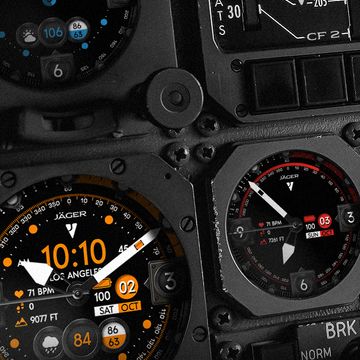
Jåger CF2
Click on each element to toggle it on or off.
- Tap the logo to change the color
- Tap the weather area to turn off and on
- Tap the center to turn hands off and on
- Tap the 3 to cycle through the battery/date and health/altitude
- Tap the 6 to turn the inner tick marks off and on
- Tap the digital time to turn off and on
- Tap the 9 to cycle through 3 different states of the middle ring and animation
Follow to get notified of new releases!
Published on Oct 8, 2021
Other faces by this designer


Comments

@Vinicius Oliveira: Thanks! ok while it will be lacking in functionality, if you add a “W6” to the name, you’ll find the version that will work with your watch.

This is my favorite display. But after updating to One UI 8.0, Facer says it's incompatible with my watch: Galaxy Watch 4 Classic. What should I do?
@Marc:
@Marc: Thanks! You must have updated your watch. The old ones dont work with the new watches due to Google changing their OS. Here's the version that should work with your watch now. https://beta.facer.io/watchface/97CGtlB2ZE?watchModel=galaxyWatch7Ultra


I love this face. been using for over a year but it suddenly says unavailable? I have a galaxy watch 6 classic. any ideas?
@Anderson: Awesome thanks for the great pic and glad you like!