 Linlay Designs™

WATCH FACE FOR APPLE WATCH & APPLE WATCH ULTRA
Beach Buddy 2
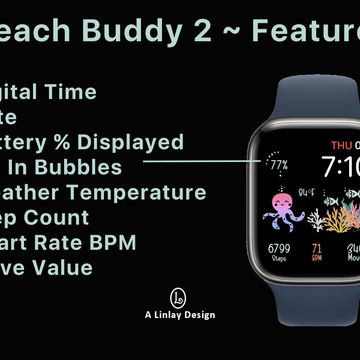
Enjoy these summer colors while you are at the beach or sitting by the pool. Featured on this original design with the handpainted elements you will find Digital Time, Date, Watch Battery Status (progress bubbles), Weather Temp, Step Count, Heart Rate, and Move Value. Don't forget to follow Linlay for more fun Apple designs.

Published on Jul 11, 2022
Other faces by this designer


Comments (7)

Sealy
But mine is with the battery percentage. I’m new to all this so I just figured it was supposed to be manually refreshed at times. I adore your designs. They are by far my #1 favorite! Thanks for all your hard work!

Linlay Designs™
Face author
@Bess: Restarting once a day is all you should have to do. If you need to refresh more than that, check your settings to see how many apps you have given permissions to to run all the time. I charge my battery at night and restart each morning - no more than that. Thank you for the kind words.