 DADAM Watch Faces

WATCH FACE FOR WEAR OS (WFF)
DADAM109: Pro Data Watch Face
Take control of your information with the <b>DADAM109: Pro Data Watch Face</b> for Wear OS. ⌚ This watch face is an incredibly informative and customizable digital dashboard, designed to put all your essential daily, health, and weather data on a single screen. Its standout feature is the ability to switch between two unique visual styles—a sophisticated 3D look or a sleek, battery-saving line art style. It's the ultimate tool for the data-driven user.
<b>Why You'll Love DADAM109:</b>
* <b>Switch Your Style Instantly ✨:</b> Choose between a sophisticated 3D style or a sleek, AMOLED-friendly line art design to perfectly match your mood and battery needs.
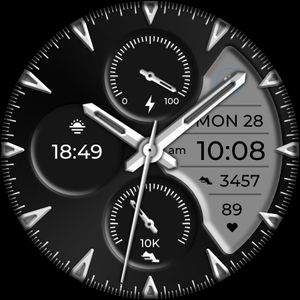
* <b>Every Stat You Need 📊:</b> A true information hub! See the time, full date with week number, weather, steps, calories, heart rate zones, and battery level at a single glance.
* <b>Total Layout Control 🎨:</b> Personalize your dashboard with custom colors, two app shortcuts, and a complication for your favorite third-party data.
<b>Key Features at a Glance:</b>
* <b>Two Unique Visual Styles ✨:</b> The standout feature! Instantly switch between a spatial (3D) design and a pure black (AMOLED) line art style.
* <b>Advanced Heart Rate Monitor ❤️:</b> Tracks your BPM and displays a helpful icon indicating if your heart rate is in a low, normal, or high zone.
* <b>Comprehensive Date Display 📅:</b> A detailed date panel shows the week of the year, month, day, day of the week, and the year.
* <b>Bold Digital Time 📟:</b> A large, clear time display with 12h/24h modes, AM/PM/24h indicator, and seconds.
* <b>Full Activity Dashboard 👣:</b> Monitor your daily step count, estimated calories burned, and progress on a 10K step goal status bar.
* <b>Live Weather Conditions 🌦️:</b> Displays the current temperature and weather conditions.
* <b>Battery Percentage 🔋:</b> Always know your watch's remaining power.
* <b>Two Custom Shortcuts 🚀:</b> Set up two shortcuts for one-tap access to your most-used apps.
* <b>One Custom Complication ⚙️:</b> Add one extra data widget from any Wear OS app.
* <b>Customizable Colors & AOD 🎨:</b> Personalize the accent colors and the look of the Always-On Display.
Published on Jan 3, 2026