WATCH FACE FOR WEAR OS (WFF)

CX060 ʷᶠᶠ


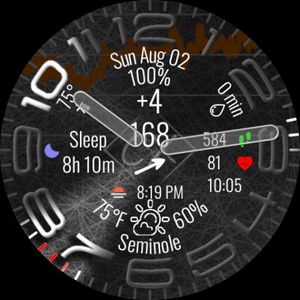
Digital Watch Face with 24 Hour Condition Forecast and Temperature Graph 19 Colors 14 Fixed Complications - Battery Level with Icon - Steps Count (Feet Icons Animation Speed Increases with your number of steps) - Heart Rate (Heart Icon Beats with your actual Heart Rate) - Sunset/Sunrise - UV Index - Current Temperature - Current Chance of Precipitation - Hourly Temperature Forecast Graph - BiHourly Weather Forecast - High/Low Temperature - Minutes Since Last Weather Refresh - Temperature Trend Arrow - Date (MM/DD) - Moon Visbility Percentage with Phase Icon 7 Customizable Complication Slots - 1 SMALL_IMAGE (Bottom Layer across top 50% of screen) mostly for Blood Glucose Graph, but can be used for other things - 1 LONG_TEXT (Just above the time) works well for Location when set to Native Weather, also works well for Next Event - 5 SMALL_TEXT/TITLE/ICON (across the top just above the LONG_TEXT Complication Slot - Tap Battery for Battery App - Tap Moon to Launch Moon on Wear, or open link to Play Store - Tap Anything Weather to Launch Weather app to Refresh Button - Tap Colon between Hours:Minute to Launch Recent Apps - Tap Date to Launch Calendar App
Lifestyle weather forecast forecast infoboard dashboard glucodatahandler gdh bg glucose blood glucose

CX060 ʷᶠᶠ by Creative eXtremes


Published on Aug 10, 2026


Comments

Install Facer to get this watch face